Proxying
Proxy Server
A proxy, or proxy server, is an intermediary server between a user and a resource on the network. The proxy server tells the target resource only information about itself, and it connects to the resource instead of the user.
A proxy server works at the application layer of the TCP/IP network model. This means that a proxy server operates above transport-layer protocols (for example, TCP or UDP), as well as above network-layer protocols (for example, IPv4 or IPv6). Proxy servers work with different protocols that provide communication with a resource (for example, FTP, HTTP, or SSH).
Proxy servers mostly function at the application layer, and in everyday discussion this is usually what is meant by them. However, below we will discuss proxies that can also interact with data at lower layers, for example at the transport layer (TCP/UDP).
SOCKS Proxy
The protocol is a translator (something like a proxy server), but unlike ordinary proxies, SOCKS “sits” between the application and transport layers in the network model. It provides data transfer over several protocols at once in one “container” (HTTPS, FTP, SSH, SMTP, IMAP, and others). It is not tied to a specific application.
SOCKS4 is designed to work through a firewall without authentication for client-server applications. A SOCKS server can be viewed as a firewall.
SOCKS5 is an incompatible extension of the SOCKS 4 protocol. It adds support for UDP, domain names, and IPv6 addresses. It uses several authentication methods:
- Null authentication - in this case, no authentication procedure is required to connect to the proxy;
- Username and password authentication - the connection is established after entering valid credentials;
- GSS-API authentication - both client and server use authentication methods that operate at the OS level.
Shadowsocks
This is a SOCKS-based protocol created by Chinese users to bypass internet blocking. Its distinctive feature is encryption. The user can specify what information they want to encrypt and what they do not.
As a result, the protocol provides greater security during information transmission than ordinary SOCKS and bypasses blocking better. In addition, traffic is disguised as a normal HTTPS connection.
Tunneling
Introduction and SSH Tunneling Terms
0.0.0.0, also known as “*”, also known as “nothing” - all IPv4 addresses on the local machine. If a machine has two IP addresses and a server running on the machine listens on 0.0.0.0, it will be available on both of these IP addresses.
127.0.0.1 - loopback address. It is used to establish a client connection to a server inside the same machine. No data packet addressed to 127.0.0.1 ever leaves the computer.
SSH client - the machine that wants to connect somewhere and initiates the connection.
SSH server - the machine to which the client connects.
SSH proxy server - a machine that works over the SOCKS(4/5) protocol and forwards traffic from one port and/or network to another port and/or network. SSH supports connections over SOCKS4 and SOCKS5.
Sender socket - a combination of the sender’s IP address and port.
Receiver socket - a combination of the receiver’s IP address and port.
It is important to remember that each connection between the SSH server, sender socket, and receiver socket is a separate TCP connection (session).
Local Port Forwarding ssh -L
Essentially a bind shell through an SSH proxy. The machine on which the command is executed works with sensitive data (receives it from someone on its network or generates it on its localhost) that must be transmitted through an untrusted environment.
Command scheme:
ssh -L <X>:<port_x>:<Y>:<port_y> <SSH-server>
Where to forward from - <X>:<port_x>:
<X>:<port_x> is the address (interface) and port of the machine we are listening on. We execute the command on this machine. Connections will knock on this address and port and create connections. Connections can come from the internet, or from localhost, for example from some application.
What to forward through - <SSH-server>:
<SSH-server> is the server through which traffic will be forwarded, for example the domain name of an SSH server on the internet, or some server that has LAN access to a database.
Where to forward to - <Y>:<port_y>:
<Y>:<port_y> is the address and port where <SSH-server> must forward the connection. Traffic will be forwarded to this address. It can be the server itself or another host.
Required configuration on the SSH server:
TCP forwarding
/etc/ssh/sshd_config -> AllowTcpForwarding -> yes
Required configuration on the SSH client:
When forwarding ports on interfaces other than 127.0.0.1, GatewayPorts must be enabled on the local system.
/etc/ssh/ssh_config -> GatewayPorts -> yes
Example 1:
Forwarding traffic from the local system to a remote host port using an SSH server:
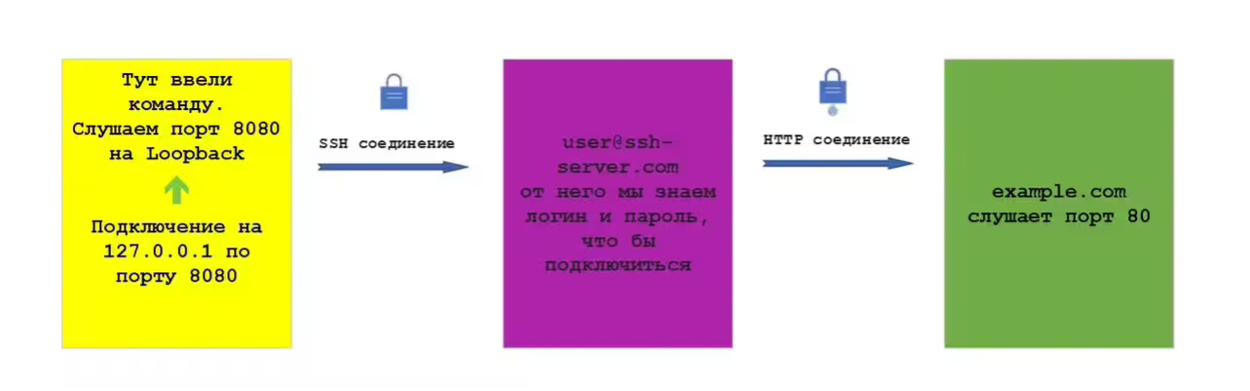
ssh -L 127.0.0.1:8080:example.org:80 [email protected]
This command specifies that connections to port 8080 on the local machine 127.0.0.1 must be forwarded to host example.org and port 80 through the SSH server. Traffic between the local system and the SSH server goes through the SSH tunnel. Traffic between the SSH server and example.org does not. From the perspective of example.org, the traffic comes from the SSH server.
Example 2:
The following commands forward traffic to example.org:80 through an SSH tunnel for connections to port 8080 on all interfaces of the local system.
ssh -L 8080:example.org:80 [email protected]
identical to
ssh -L *:8080:example.org:80 [email protected]
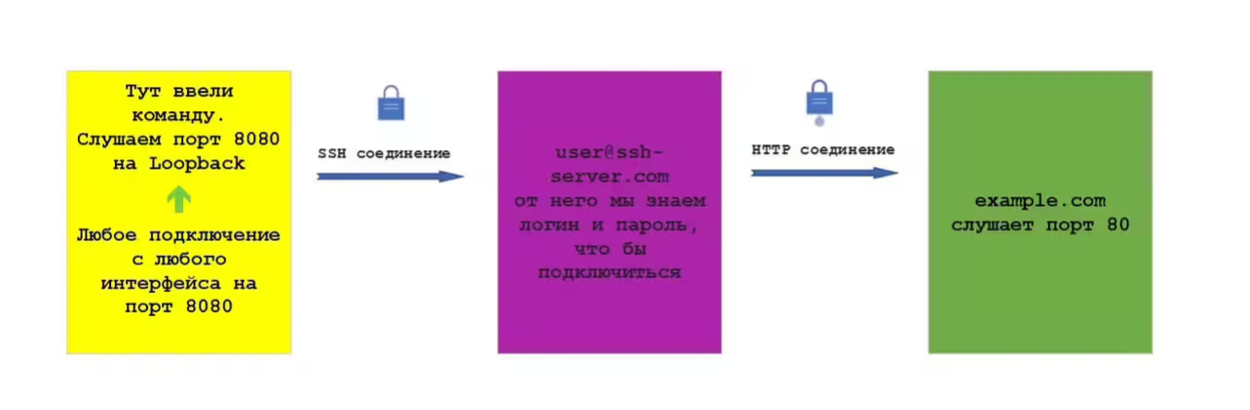
This means that whoever tries to connect to our local machine on port 8080 through any interface will be forwarded through the SSH tunnel to the SSH server, and from there to port 80 on example.org.
Example 3:
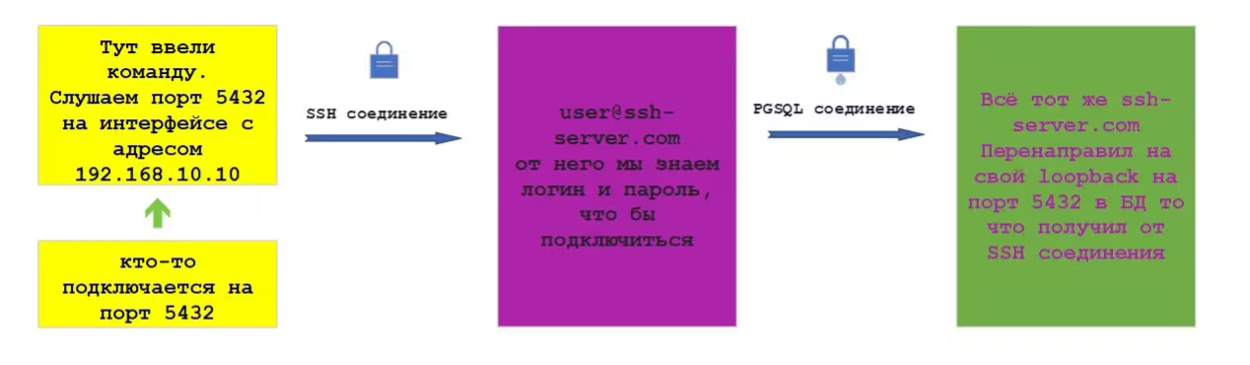
The following command forwards traffic going to the local machine address 192.168.10.10 on port 5432 (PostgreSQL) through an SSH tunnel to the SSH server and then to address 127.0.0.1 and port 5432.
In other words, suppose we have a database running on our machine, someone connects to it, and we forward that connection through an SSH tunnel to the SSH server, and from there to our localhost, also on port 5432.
ssh -L 192.168.10.10:5432:127.0.0.1:5432 [email protected]
Remote Port Forwarding ssh -R
Essentially a reverse shell through an SSH proxy. The machine on which the command is executed does not have its own SSH server or cannot accept an incoming SSH connection because of NAT or a firewall. However, if the machine can connect with its SSH client to a remote SSH server, this command allows port forwarding on the SSH client side.
Command scheme:
ssh -R <X>:<port_x>:<Y>:<port_y> <SSH-server>
Where to forward from - <X>:<port_x>:
<X>:<port_x> is the address (interface) and port on which <SSH-server> will wait for a connection. Usually only the port is specified, in which case all interfaces of <SSH-server> are listened on.
What to forward through - <SSH-server>:
<SSH-server> is the server through which traffic will be forwarded, for example the domain name of an SSH server on the internet, or some server that has LAN access to a database. We connect to it with our SSH client, from which the command will be executed.
Where to forward to - <Y>:<port_y>:
<Y>:<port_y> is the address and port with which we will establish a connection. This can be localhost or a remote host. This part is executed by the SSH client on which the command is run.
As soon as <X>:<port_x> establishes a connection to <SSH-server>, the machine establishes a connection to <Y>:<port_y> and forwards data between <X>:<port_x> and <Y>:<port_y>.
Required SSH server configuration:
- When forwarding ports on interfaces other than 127.0.0.1, GatewayPorts must be enabled on the local system.
/etc/ssh/sshd_config -> GatewayPorts -> yes
- Specify which clients are allowed access
/etc/ssh/sshd_config -> GatewayPorts clientspecified -> ip_address
Example 1:
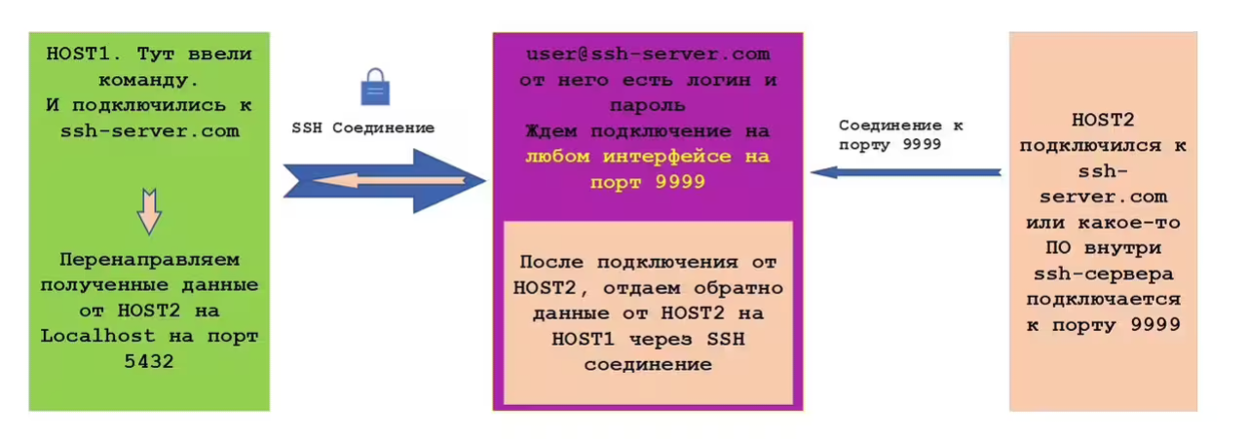
After a successful connection to [email protected] from HOST1, the SSH server starts listening on port 9999. When HOST2 connects to ssh-server.com on port 9999, the SSH client on HOST1 establishes a connection to its localhost on port 5432 and passes through this connection the data received by ssh-server.com on port 9999 from HOST2.
ssh -R 9999:localhost:5432 [email protected]
Example 2:
After a successful connection to [email protected] from HOST1, the SSH server starts listening on port 443 on the interface with address 192.168.10.10. When HOST2 connects to ssh-server.com on port 443, the SSH client on HOST1 establishes a connection to its localhost on port 80 and passes through this connection the data received by ssh-server.com on port 443 from HOST2.
ssh -R 192.168.10.10:443:localhost:80 [email protected]
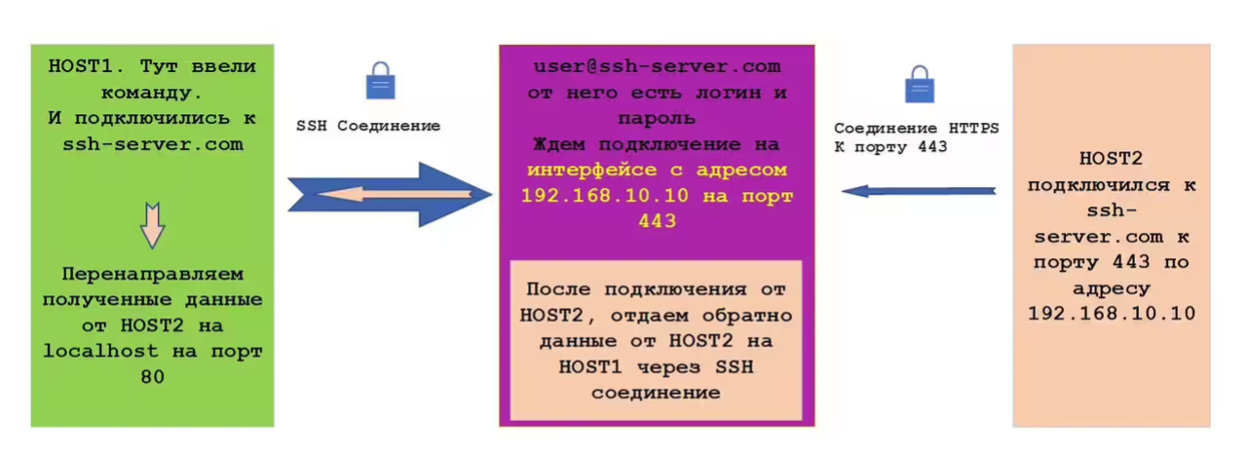
Example 3:
After a successful connection to [email protected] from HOST1, the SSH server starts listening on port 80 on the interface with address 192.168.10.10. When HOST2 connects to ssh-server.com on port 80, the SSH client on HOST1 establishes a connection to its example.com on port 443 and passes data received by ssh-server.com on port 443 from HOST2.
ssh -R 192.168.10.10:80:example.org:443 [email protected]
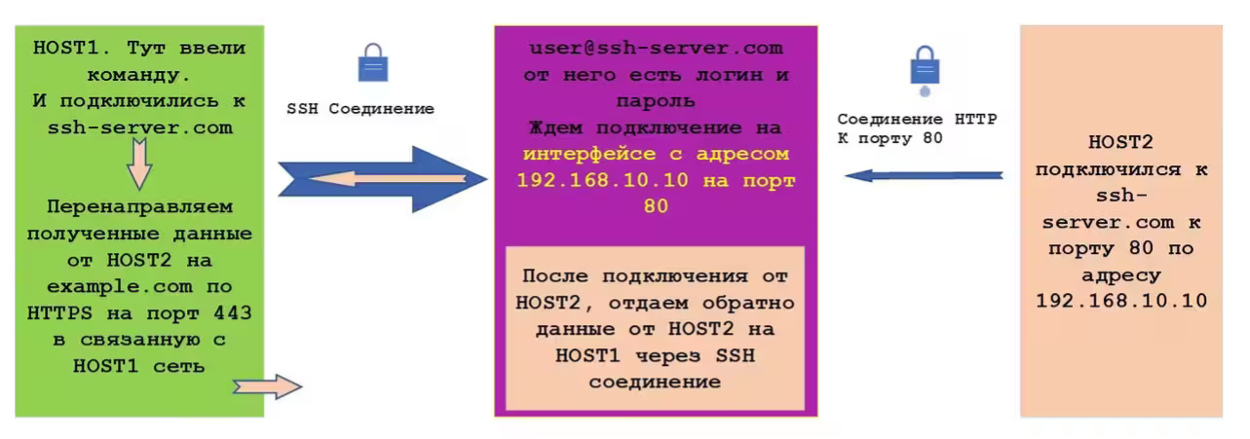
Dynamic Port Forwarding ssh -D
Dynamic port forwarding makes it possible to create a socket on the local computer and forward all traffic to a remote SSH server. When someone connects to the specified port, the connection is forwarded to the remote SSH server, and from there through the routes of that SSH server.
Command scheme:
ssh -D <X>:<port_x> <SSH-server>
Where to forward from - <X>:<port_x>:
<X>:<port_x> is the address (interface) and port on which <SSH-server> will wait for a connection. Usually only the port is specified, in which case all interfaces of <SSH-server> are listened on.
What to forward through - <SSH-server>:
<SSH-server> is the server through which traffic will be forwarded, for example the domain name of an SSH server on the internet, or some server that has LAN access to a database. We connect to it with our SSH client, from which the command will be executed.
Required SSH client configuration:
- When forwarding ports on interfaces other than 127.0.0.1, GatewayPorts must be enabled on the local system.
/etc/ssh/ssh_config -> GatewayPorts -> yes
Example 1:
HOST1 has no internet access, but has access to an SSH server that already has internet access. HOST1 creates a tunnel with the SSH server, and when its browser connects to port 6000, all traffic is forwarded to the SSH server.
ssh -D 127.0.0.1:6000 [email protected]

Jump Hosts ssh -J
It is necessary to reach some server. There is no direct access, but we know how to get through several hops: intermediate SSH servers.
Command scheme:
ssh -J user1@jump_ssh-server1,user2@jump_ssh-server2 [email protected]

Tunneling is the process of wrapping one network protocol inside another to create a secure logical channel (tunnel) between two points, often to protect data. Proxying is an action where a proxy server (intermediary) processes client requests to other network services, acting as a gateway and hiding the client’s IP address. The main difference: tunneling creates an encrypted channel, while proxying is an intermediary function that can be performed without encryption.