Everything described below is the result of a technical experiment. The material is not advertising, does not call for any action, is provided solely for informational purposes, and was prepared as part of research.
Link to the official GitHub repository
Capture
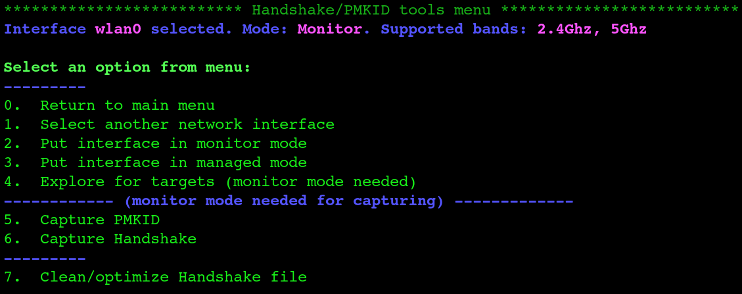
Capture Handshake
Capture Handshake is the most universal attack against WPA/WPA2 technology, because this is what is used in the vast majority of wireless access points. When clients connect to an access point, WPA/WPA2 uses the EAPOL security protocol, during which a step-by-step data exchange takes place between the access point and the client that wants to connect. The essence of the attack is that the attacker needs to intercept all (or at least part) of the transmitted data and then find the correct password by brute force. Simply put, first you need to capture the handshake (at the EAPOL stage), and then use brute force to find the correct password.
Capture PMKID
PMKID is the Pairwise Master Key Identifier.
It turns out that many modern routers add an optional field at the end of the first EAPOL frame that includes the PMKID. It is formed from known data:
PMKID = HMAC-SHA1-128 ( PMK, “PMK Name” | MAC_AP | MAC_STA )
Therefore, it can easily be used to form a hash.
This attack was discovered accidentally while searching for new ways to attack the future WPA3 security standard. WPA3 is much harder to attack because of its modern key-establishment protocol called “Simultaneous Authentication of Equals” (SAE).
The advantage of this attack is that the attacker no longer needs to wait for “users” to appear and connect to their WiFi in order to disconnect them and capture the Handshake. The downside is that this attack takes a lot of time.
Procedure
The capture process for the two modes is roughly the same:
- Select the mode
- Then, following the program flow until access-point selection, the attacker chooses the required network
If Capture Handshake mode is selected, the deauthentication type must also be selected. All types can be used, but in most cases Deauth aireplay attack is chosen.
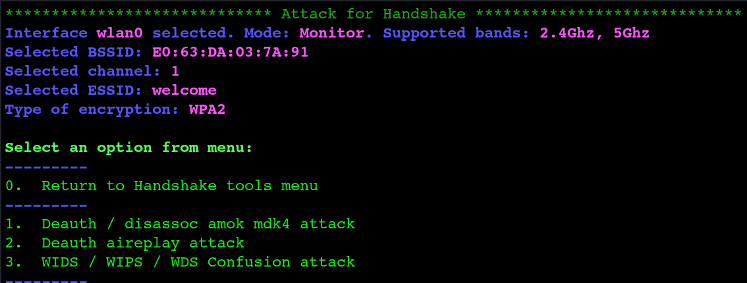
Deauth / disassoc amok mdk4 attack
A type of network attack that uses the mdk4 utility to send many disassociation (disassoc) and deauthentication (deauth) packets to clients on a wireless network. This can lead to temporary loss of communication between clients and the access point, and in some cases can lead to a complete internet outage or inability to connect to the network.
Deauth aireplay attack
A method of attacking wireless networks that is used to forcibly disconnect client devices from a wireless access point. In this attack, the attacker sends fake deauthentication packets to client devices, forcing them to reconnect to an available access point.
WIDS / WIPS / WDS confusion attack
- WIDS (Wireless Intrusion Detection System) is used to detect anomalies or intrusions in wireless networks. It monitors network traffic and detects unusual or suspicious behavior, such as unauthorized access, intrusion, or malicious traffic.
- WIPS (Wireless Intrusion Prevention System) extends WIDS functionality by providing the ability to take preventive action or block intrusions. It can automatically respond to detected threats, for example by disconnecting or blocking attacking devices.
- WDS (Wireless Distribution System) is a method for connecting wireless networks and devices in order to extend network coverage or create a bridge between different network segments.
The attacker creates confusion or disrupts the operation of WIDS, WIPS, and WDS systems. This can be done by generating false threats, spoofing data packets, or creating an environment that causes security systems to respond incorrectly or block incorrectly.
Next, a timeout is selected (how long to wait for results). The default is 25, but most often a longer time is set, enough to wait for packets, for example 50.

After a successful attack, the attacker has a *.cap file with the hash; from there it is rainbow tables or brute force.
Evil Twin Attack
This is essentially a MITM (man-in-the-middle) attack, meaning the attacker is between the target person and the WiFi modem. To perform this attack, the attacker pretends to be a modem providing internet access and applies a Deauth attack (which disconnects users from the WiFi modem) to the target modem. The attacker provides WiFi services to clients while the real modem refuses to serve them.
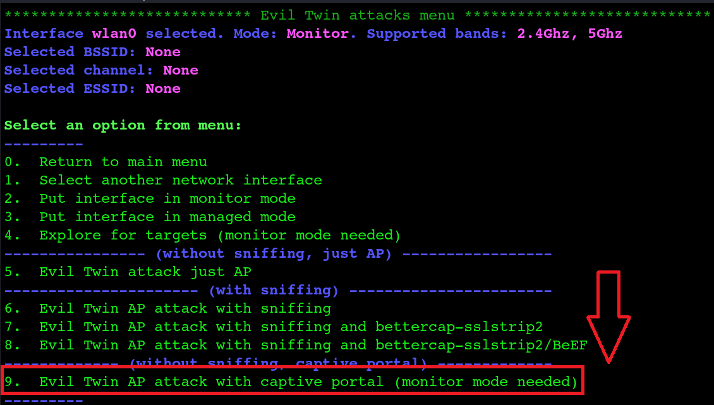
This article will consider the Evil Twin AP attack with captive portal.
Captive Portal
This is something like a screen that often appears when connecting to open WiFi networks. The attacker uses this screen, which contains terms and conditions, to create a phishing page.
The default pages offered by airgeddon look very suspicious, so potential attackers usually create their own page.
Briefly about creating a captive portal:
- Go to the GitHub link
- Download the custom_portals.sh bash script
- Copy this file into the directory - /usr/share/airgeddon/plugins/
- Create a custom_portals folder in the same directory
- The created captive portal pages will be stored inside this folder
- Each captive portal is located in a separate folder with its own files
Procedure
After selecting the mode, the program may show a warning.

This means that your adapter does not support VIF (Virtual Interface), which is required to simultaneously create an access point and perform a deauthentication attack against the real network. To combine 2 interfaces that do not support VIF, a special plugin must be installed:
- Go to the GitHub link
- Download the multint.sh bash script
- Copy the script into the directory: /usr/share/airgeddon/plugins/
- Now it is possible to use 2 separate interfaces for the attack
The next step is to select the target access point. Then the deauthentication type is selected. After that, the program asks whether to enable DoS pursuit mode.
DoS pursuit mode is a mode for following the attacked access point when it switches to another channel. When DoS pursuit mode is enabled, an additional interface is required.

Then the program asks whether to change the MAC address during the attack; this is a matter of preference.

Next, if a handshake file is available, select Y and specify the path to the file. If there is no handshake file, select N.

The next step is to select the timeout (how long to wait for results) and the Captive Portal.

After that, the program asks whether password detection containing *&/?<> should be enabled.
Enabling detection of passwords containing *&/?<> is very dangerous because injections can be performed on the captured portal, and the attacker themselves can be hacked through some kind of command injection on the captive portal page.
Then the language for the Captive Portal is selected, provided that it is written in different languages.
As a result, 6 windows will be created. Each password is compared with the hash from the handshake and recorded in a file. When the correct password is entered, the program stops.